Canonical
9 August 2019
Enhanced Livepatch desktop integration available with Ubuntu 18.04.3 LTS
Ubuntu 18.04.3 LTS has just been released. For the Desktop, newer stable versions of GNOME components have been included, as well as a new feature – Livepatch desktop integration.
As usual with LTS point releases, the main changes are a refreshed hardware enablement stack (newer versions of the kernel, xorg & drivers) and a number of bug and security fixes.
For those who aren’t familiar, Livepatch is a service which applies critical kernel patches without rebooting. The service is available as part of an Ubuntu Advantage subscription but also made available for free to Ubuntu users (up to 3 machines). Fixes are downloaded and applied to your machine automatically to help reduce downtime and keep your Ubuntu LTS systems secure and compliant. Livepatch is available for servers and desktop.
To enabling Livepatch you just need an Ubuntu One account. The set up is part of the first login or can be done later from the corresponding software-properties tab.
Here is a simple walkthrough showing the steps and the result:
The wizard displayed during the first login will help you get signed in to Ubuntu One and enable Livepatch:

Clicking the ‘Set Up’ button invites you to enter you Ubuntu One information (or to create an account) and that’s all that is needed.

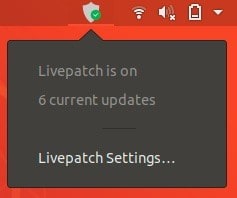
The new desktop integration includes an indicator showing the current status and notifications telling when fixes have been applied.
You can also get more details on the corresponding CVEs from the Livepatch configuration UI
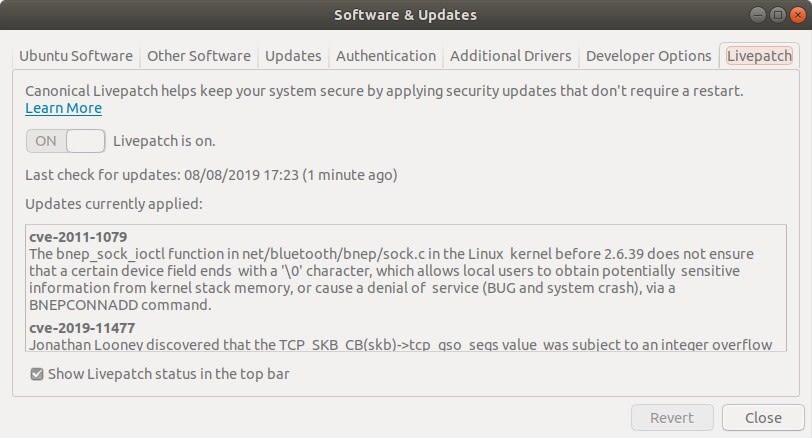
You can always hide the indicator using the checkbox if you prefer to keep your top panel clean and simple.
Enjoy the increased security in between reboots!